DAY 15 Task: Python Libraries for DevOps
Day 15 : #90DaysOfDevOps Challenge

What are Python libraries?
A Python library is a collection of pre-written code that provides specific functionalities and can be imported and used in other Python programs. A library can contain functions, classes, and modules that can be used by other programs, saving time and effort in development.
Python libraries are often created to solve specific problems and make it easier for developers to write code by providing pre-built solutions. They can be open-source or proprietary and can be installed via Python’s package manager, pip.
In DevOps, Python libraries can be used to automate tasks, interact with APIs and cloud services, and manipulate data, among other things. Common DevOps tasks that can be facilitated by Python libraries include server configuration and management, software deployment, testing, and monitoring.
Tasks:
- Create a Dictionary in Python and write it to a json File.
In Python, you can create a dictionary using curly braces {} or by using the built-in dict() function. Once you have created a dictionary, you can write it to a JSON file using the json module.
Here’s an example of how to create a dictionary and write it to a JSON file in Python:
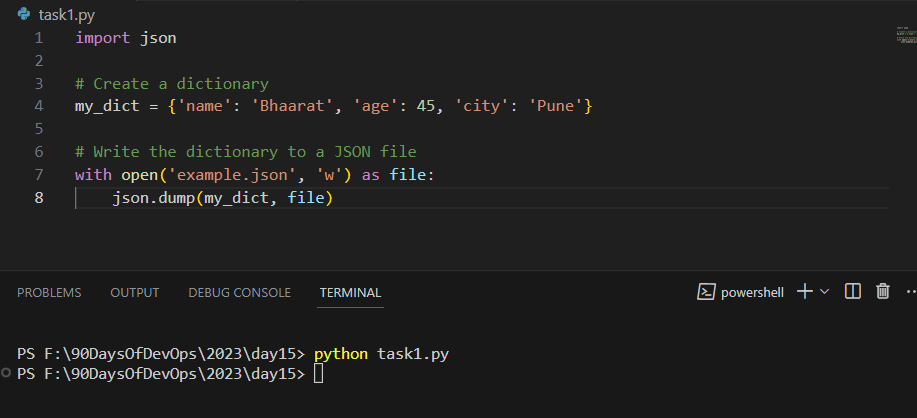
In this example, we first create a dictionary called my_dict with three key-value pairs. Next, we open a file called example.json in write mode using the open function and write the dictionary to the file using the json.dump function.
The json.dump function serializes the dictionary object to a JSON formatted string and writes it to the file object. The with statement is used to ensure that the file is properly closed after it's been written to.
After running this code, you should see a file called example.json in your working directory with the contents of the my_dict dictionary.

In summary, creating a dictionary in Python is easy and can be done using curly braces {}, the dict() function, or by creating an empty dictionary and adding key-value pairs to it later. You can write a dictionary to a JSON file using the json.dump function from the json module.
- Read a json file
services.jsonkept in this folder and print the service names of every cloud service provider.
The output should be:
   aws : ec2
   azure : VM
   gcp : compute engine
JSON file called
services.jsonand print the service names of every cloud service provider: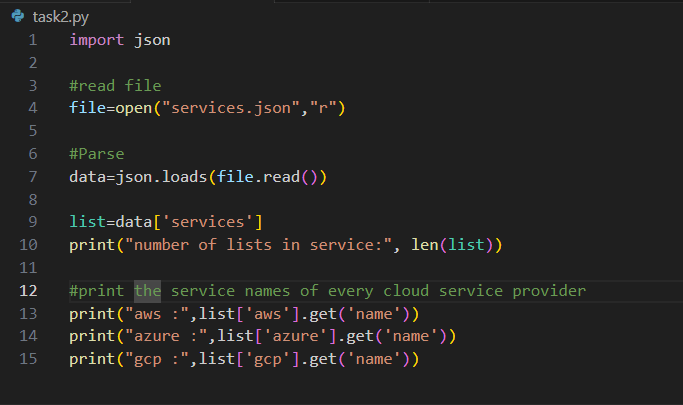
In this example, we first open the
services.jsonfile and load its contents into a Python dictionary using thejson.load()function.Next, we iterate over the list of cloud service providers in the
datadictionary and print the provider name. For each provider, we then iterate over the list of services and print the name of each service.The output of this code would be:

Thank you for reading!! Hope you find this helpful.Thank you for reading!! Hope you find this helpful.
#day15challenge#90daysofdevops
Always open to suggestions..!!
~ Manoj Bhamidipati 🙂


